
Table of Contents
Allowing a smartwatch to listen in on daily conversations sounds intrusive, but testing the new Audio Intelligence feature on the Apple Watch proved to be much more mundane than expected. CNET spent two weeks testing the public beta version of WatchOS 27.3, exploring how tools like Siri Recap and Live Rewind perform in everyday life.
Understanding the New Audio Features
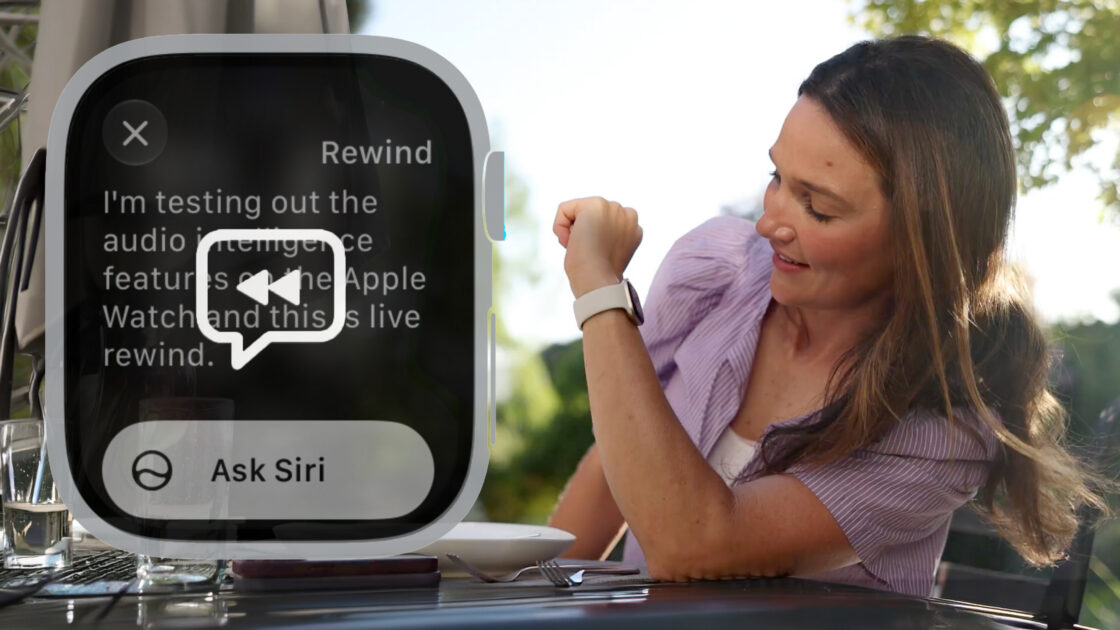
Introduced alongside the Apple Watch Series 12 and Apple Watch Ultra 4, Audio Intelligence brings listening and note-taking capabilities to the wrist without requiring an extra subscription or cost. The suite includes Siri Recap, which generates summaries of daily discussions, and Live Rewind, which provides a transcript of the preceding 15 seconds of audio.
Users must explicitly opt in to activate these features and can run them all day, follow a schedule, or toggle them manually. While the user control helps reduce concerns about privacy, CNET noted that there is no obvious indicator light for bystanders, unlike smart glasses that feature front-facing recording LEDs. A barely audible chime sounds only when the user double-clicks the Digital Crown to activate Live Rewind.
Evaluating Live Rewind and Siri Recap
Live Rewind proved difficult to incorporate into natural habits, as remembering to double-press the Digital Crown at the exact right moment is harder than simply asking someone to repeat themselves. Fifteen seconds pass quickly, often leaving the user with silence or missing the intended remark, making the tool potentially more useful during a presentation than in casual chats.
Siri Recap offered more utility but yielded mixed results. The feature provides high-level summaries without identifying specific speakers or supplying full transcripts. It performed best during structured meetings, such as capturing technical statistics during a live folding test on YouTube. However, during a conversation about carpool logistics, Siri generated inaccurate names and assigned the wrong child to the pickup schedule.
Handling Messy Conversations and Future Recommendations
Siri also struggled to separate unrelated discussions that occurred within the same time window, occasionally combining serious medical talks with chaotic household incidents into a single summary. It even mistook dialogue from a late-night Netflix binge of Nobody Wants This for actual wedding planning conversations.
Ultimately, CNET suggests using Siri Recap intentionally for specific events like work meetings or doctor appointments rather than leaving it active all day, and advises keeping a separate backup for critical information.