
Table of Contents
Apple has officially entered the smart display market with the HomeView, a $299 device that functions as a central hub for the home. As reported by Engadget, the device distinguishes itself from competitors like Amazon and Google by relying heavily on a companion iPhone or iPad to mirror apps and process personal data.
Design and Hardware
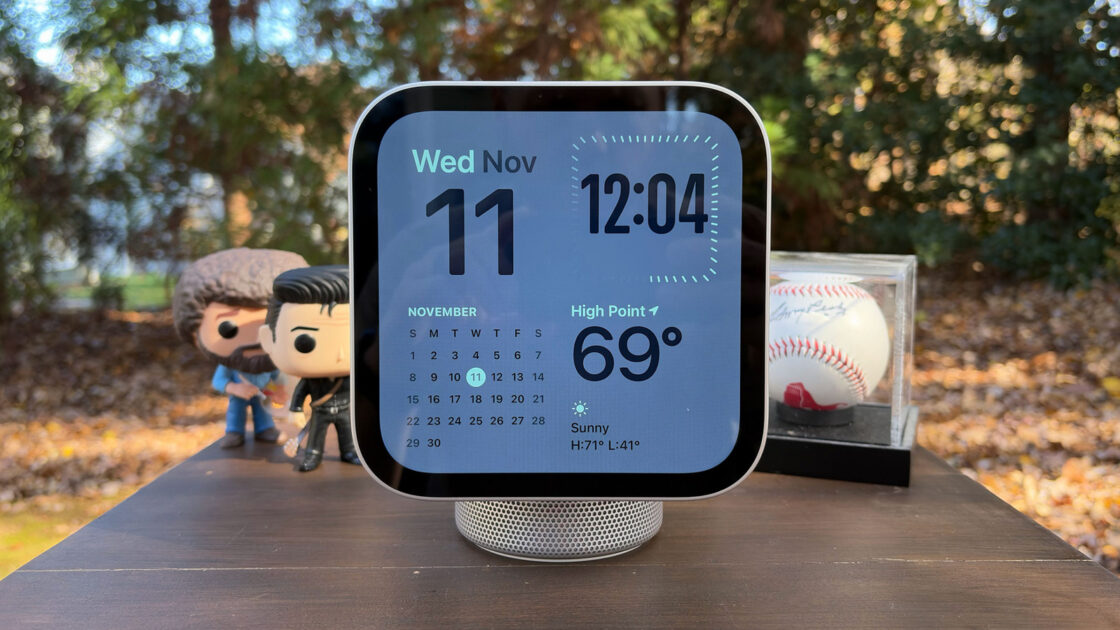
The HomeView features a 7-inch Liquid Retina display with a 1,088 x 1,088 resolution. The tabletop model includes a cylindrical base housing a down-firing woofer and force-canceling passive radiators, while a wall-mounted version is also available. The display uses an LED-backlit IPS panel with an ambient light sensor that adjusts brightness from a maximum of 500 nits down to 0.3 nits for nighttime use.
Interaction is entirely touch-based or voice-controlled, as the device lacks physical buttons. While the screen can be tilted, it does not offer height adjustment. The device is powered by the A18 chip, which enables on-device processing for security, and connects via a single USB-C port. Tabletop models are available in four colors, while wall-mounted versions come in Silver or Space Gray.
Siri AI Integration
The HomeView serves as a dedicated interface for Siri AI. By utilizing the A18 chip’s Secure Exclaves, the device can process voice and facial recognition locally, ensuring that personal data—such as calendar invites or messages—remains private. Users must opt-in to Apple Intelligence on their iPhone or iPad to enable these features.
In testing, Siri demonstrated an improved ability to handle conversational queries, such as providing travel logistics or checking schedule availability. However, the device acts primarily as a conduit for the AI system, meaning many of these functions are also available on an iPhone. For security, the HomeView requires a nearby, unlocked iPhone or iPad to access personal information, though guests can still use basic features like weather or smart home controls.
Kitchen and Smart Home Utility
The device offers a specialized cooking mode when users mirror Safari recipes from an iPhone. This interface provides a streamlined view of ingredients and step-by-step instructions. While some recipes integrate perfectly with swipeable slides and timer shortcuts, others may require scrolling if the publisher has not formatted them for the system.
As a smart home hub, the HomeView supports HomeKit and Matter devices. Users can manage thermostats, lighting, and security cameras through the Home app or via Siri. The device also supports Sound Recognition for smoke or carbon monoxide alarms and can display up to nine camera feeds simultaneously on the Home Camera face.
Audio and Entertainment
The HomeView’s audio performance is described as a midpoint between the HomePod mini and the larger HomePod, offering clear vocals and punchy bass. It supports Spatial Audio with Dolby Atmos, though the compact size limits the immersive effect. While the display is vivid, video playback is currently limited to the Apple TV app, which often displays content with significant black bars due to the device’s square aspect ratio.
The HomeView also features customizable “faces” for its idle state, including photo frames, clocks, and weather widgets. It includes a 12-megapixel Center Stage camera for FaceTime calls, which automatically keeps the user in the frame. Additionally, the device supports Find My location tracking and multiroom audio via AirPlay.
The HomeView is now available for $299, with wall mounts sold separately starting at $59.95.