
Table of Contents
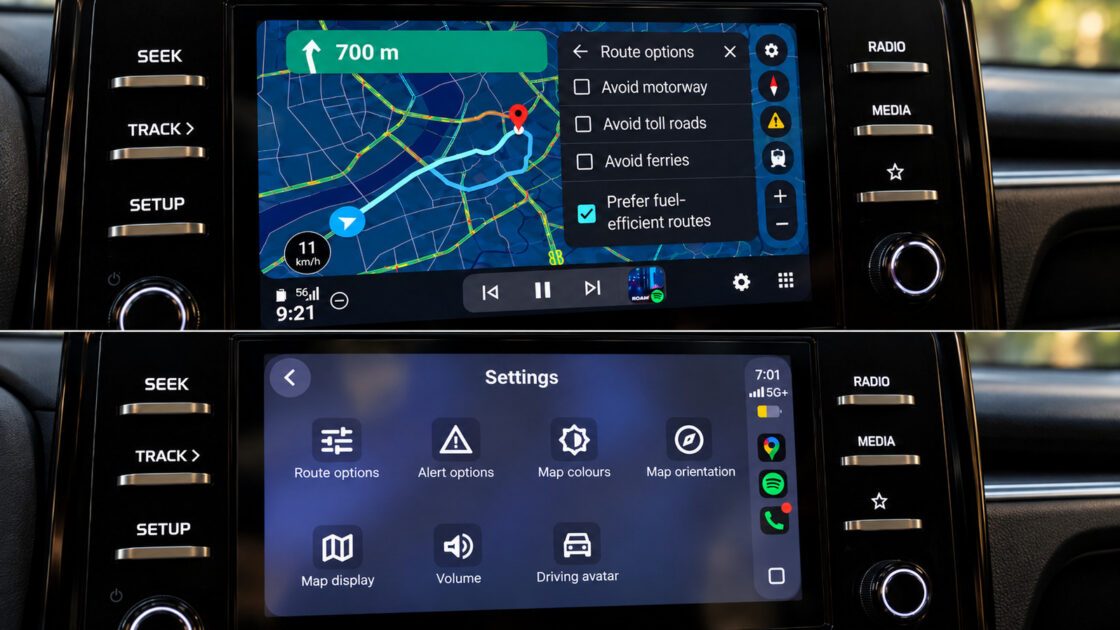
Google Maps delivers a superior experience on Android Auto compared to Apple CarPlay, even when running the exact same app within the same vehicle. Engadget tested identical searches, route adjustments, and navigation tasks back-to-back across both platforms using a 2025 Kia Sonet infotainment screen, revealing six distinct operational advantages for Google’s own platform.
Gemini Integration and Route Changes
The most prominent differences involve access to Gemini and how quickly users can alter their routes. First, invoking Gemini is easier on Android Auto because users can initiate voice commands hands-free without touching the screen. While a Gemini button eventually appeared on CarPlay during testing to handle conversational searches, hands-free activation was unavailable, and Google’s help page noted Gemini was not supported on CarPlay at the time.
Second, route modifications proceeded much faster on Android Auto. When asked to locate a fuel stop, a pharmacy, and alternative ways home in succession, Android Auto immediately displayed the options without requiring users to reopen the conversation. CarPlay handled similar requests once Gemini was open, but operated noticeably slower.
Search Results and Map Interaction
The third advantage emerged when searching for places along an active route, as Android Auto presented multiple options simultaneously complete with ratings and the extra time each detour would add. Conversely, CarPlay showed results one at a time using previous and next controls, making direct comparisons more difficult.
The fourth difference involved interacting with the map itself. Android Auto kept zoom controls easily accessible and supported pinch-to-zoom gestures directly. CarPlay required entering a standalone map-control mode where pinch-to-zoom did not function during testing.
Destinations and EV Trip Planning
The fifth benefit centers on pre-destination suggestions. Android Auto immediately displayed a Home shortcut featuring a live ETA and distance, along with categories, saved locations, and a recent section featuring past visits and search suggestions. CarPlay presented a much more bare-bones initial screen that required a manual search to find the same information. Android Auto also provided clearer explanations for Google’s fuel-efficient routing recommendations, though CarPlay retained an advantage by offering easily accessible color-scheme controls for automatic, day, and night modes.
The sixth and final advantage applies to electric vehicles in the US. Google Maps on Android Auto can estimate battery consumption for a trip by factoring in vehicle characteristics, traffic, road elevation, and weather conditions. By inputting the current battery level, the system automatically suggests charging stops, estimates arrival battery percentages, and includes charging times in the overall ETA across more than 350 EV models from over 15 brands. By contrast, Google Maps on the iPhone lacks charging stop integration for energy-efficient EV routes, and Google has not announced a comparable rollout for CarPlay.