
Table of Contents
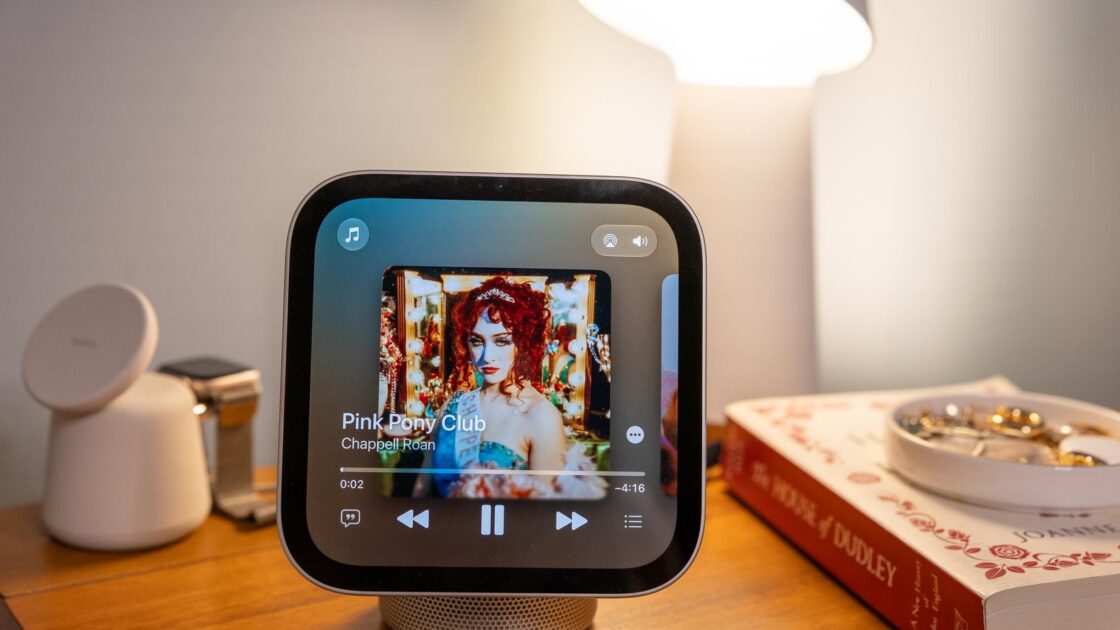
Following the initial review of Apple’s first smart display, the HomeView, further testing of its audio capabilities and third-party music app integration reveals several notable limitations. In terms of size and sound performance, the tabletop HomeView compares most closely to the HomePod Mini rather than larger dedicated smart speakers like the Sonos One or a full-size HomePod.
Audio Quality and Hardware Differences
The tabletop HomeView delivers better bass and a slightly louder output than the second-generation HomePod Mini, but it lacks the clarity and room-filling dispersion of the smaller device. This difference stems from the internal hardware: while the Mini 2 features a single full-range driver and two passive radiators, the tabletop HomeView contains two drivers inside the display along with a woofer and two passive radiators located in the base. Because the display sits directly above the speaker base, it partially obstructs the sound. Apple integrated an accelerometer so the device can adjust its EQ in real time when the display is tilted, and the unit supports Spatial Audio with Dolby Atmos, which the Mini 2 does not.
Meanwhile, the wall-mounted version of the HomeView contains only two drivers with computational audio tuned specifically for on-wall placement. This version produces noticeably thinner sound with virtually no bass, making it less than ideal for music listening though acceptable for interacting with visitors via a video doorbell.
Stereo Pairing and Speaker Defaults
Users cannot pair two HomeViews together for a stereo setup, nor can they pair a HomeView with a HomePod or a Mini, though HomeViews can be grouped with other AirPlay speakers for simultaneous playback. For native applications like Apple Music, Podcasts, and Safari, the device remembers the last-used speaker and automatically routes audio there upon return. However, third-party apps like Spotify and Apple apps utilizing the CarPlay interface default to the HomeView’s built-in speaker when controlled via Siri voice commands rather than the screen.
Additionally, the HomeView does not allow users to designate a default speaker or group to replace its built-in hardware permanently. Users can AirPlay audio smoothly to individual speakers or groups across different brands, but voice requests on third-party services require explicit directional commands if the user wants to override the default HomeView speaker.
Third-Party App Integration via CarPlay
Third-party audio and video apps on the HomeView—such as Spotify, Amazon Music, YouTube Music, Pocket Casts, and Audible—operate using Apple’s CarPlay platform rather than a dedicated smart display interface. These apps only appear when the user’s phone is connected to the HomeView via their personal profile on the same Wi-Fi network. This reliance on CarPlay introduces several frustrations, including slower performance, occasional bugs, and the complete absence of a text search field or on-screen keyboard because the interface assumes the user is driving a vehicle.
Without a search function, users must scroll through content manually or rely on Siri voice search, which occasionally fails with third-party services like Audible. Furthermore, video CarPlay apps display safety warnings telling users to remain stationary, and some apps like Netflix and Amazon Prime Video only stream audio through their native app interfaces unless accessed directly via the Safari browser.
Purchasing Recommendations
Consumers seeking a dedicated smart speaker for pure audio playback are advised to choose a traditional HomePod or alternatives like Google and Amazon speakers that allow default music providers. The HomeView is best suited for users who value its touchscreen display as a central jukebox to browse and control audio easily, provided they rely on Apple Music and understand the software limitations of third-party CarPlay integrations.