Table of Contents
Microsoft is sunsetting three Office taskbar apps just 14 months after their initial release. The People, Files and Calendar Companion apps will no longer function as of December 16.
Target Audience and Retirement Reasons
These three taskbar tools were primarily intended for users running Windows 11 on employer-managed devices. According to Engadget, Microsoft automatically added the companion apps for individuals with commercial Microsoft 365 and Office 365 licenses, meaning users of Windows 11 Home likely never had them.
In its support post announcing the retirement, Microsoft did not explain the decision to discontinue the apps. However, Engadget notes that the taskbar apps may have suffered from a lack of active users, redundancy with existing Windows tools, or perception as Windows bloatware.
Features of the Discontinued Apps
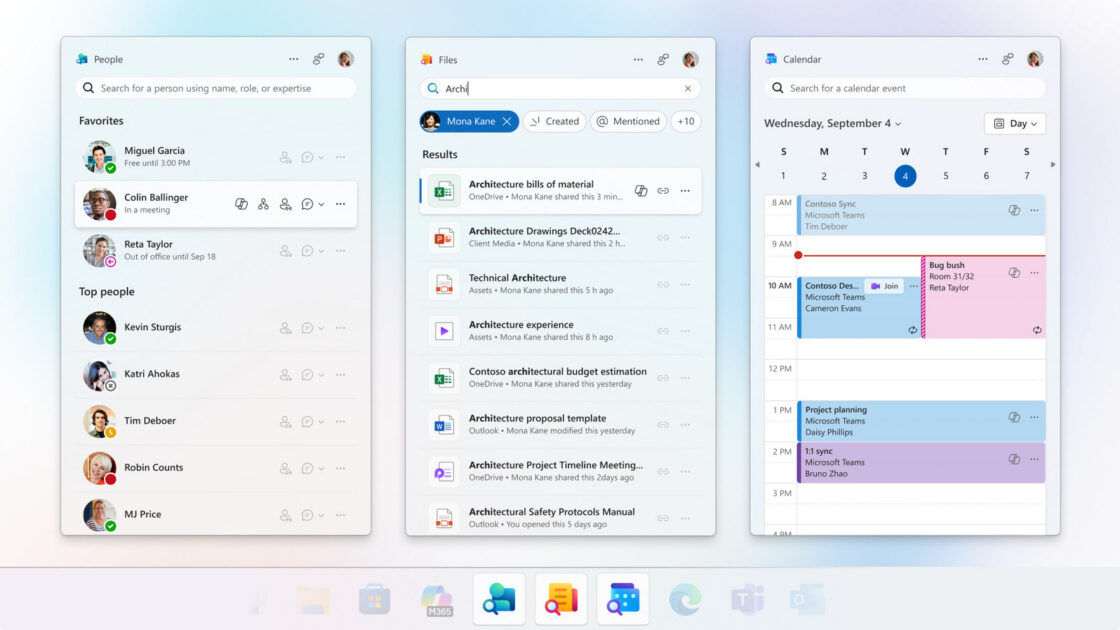
The People companion app allowed users to locate colleagues or contacts quickly, initiate Microsoft Teams calls, view shared files, check organizational charts, and monitor online statuses. Users could also view profiles, check if someone was in a meeting, send emails, pin favorite contacts, and use a Copilot connection to ask artificial intelligence about a person’s current projects.
The Files companion app provided quick access to Microsoft Office files, allowed users to create shared links with coworkers, and offered keyword search and file type sorting capabilities. Meanwhile, the Calendar companion app enabled users to view and edit Microsoft 365 calendar events, join meetings, copy meeting links, and search for specific calendar entries.
Alternative Options and Removal Process
Users remaining within the Microsoft ecosystem can use the Outlook app for Windows, which features tabs for email, contacts, and calendar. Microsoft Teams also provides messaging, calendar viewing, and video calls, while OneDrive and the Windows Start Menu search bar can replace the Files tool. Outside of Microsoft, businesses can utilize platforms like Slack and Google’s Workspace suite.
For employer-managed computers, IT administrators will likely remove the retired apps automatically. Other users can uninstall them by navigating to Windows Settings, selecting Apps, clicking Installed Apps, searching for Microsoft 365 companions, clicking the three dots, and choosing Uninstall. Microsoft confirmed that because the apps rely on SharePoint Online and Exchange Online data, uninstallation will not result in any data loss.