Table of Contents
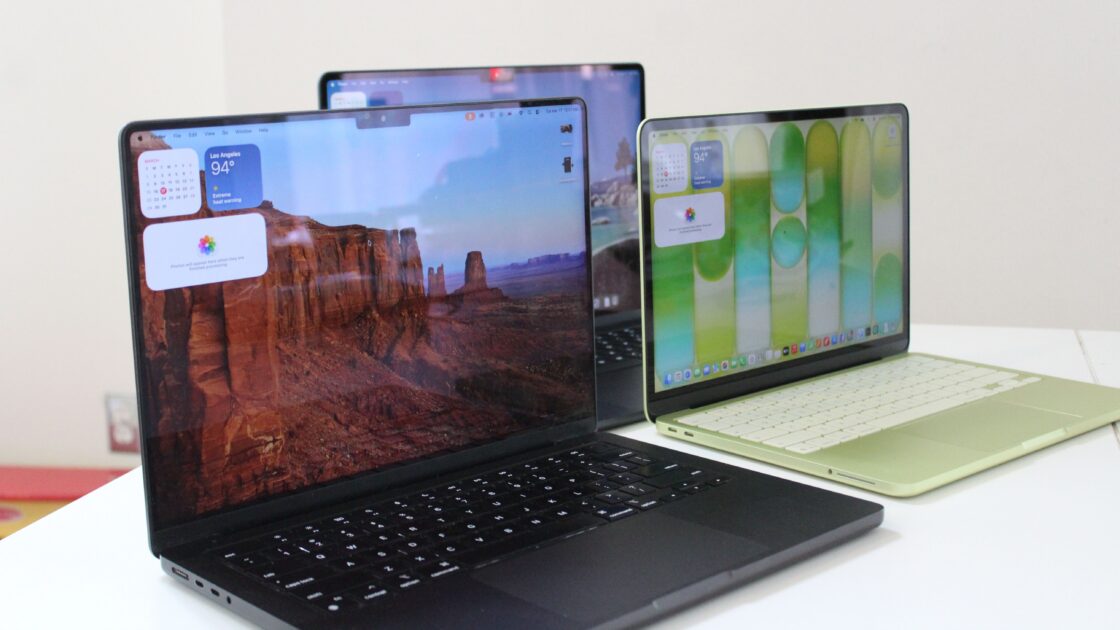
Following extensive testing of the latest Apple laptops, reviewers can help users navigate performance needs and budgets to find the right model. Updated for November 2026, this guide includes evaluations of the M6 and OLED MacBook Pros alongside revised buying advice.
The Best Overall Laptop
Despite competition from the affordable MacBook Neo and the high-end M5 Pro and Max chips in the MacBook Pro, the MacBook Air remains the top recommendation for most users. Although the 2026 M5 refresh brings modest changes, it serves as the premier choice for daily productivity work. The 13-inch model starts at $1,299, marking a $200 increase from earlier pricing trends.
While the exterior design has remained consistent since 2021, the MacBook Air offers a lightweight build, rapid SSD speeds, and support for up to two 5K external monitors. The 12-megapixel 1080p webcam handles video calls effectively. The M5 processor easily manages browser tabs, office applications, Slack, Zoom, and creative software like Photoshop or Lightroom without slowing down user workflows.
Available in 13.6-inch and 15.3-inch sizes, the models differ primarily in screen size and speaker quality, with the larger version featuring exceptional sound. The M5 MacBook Air starts with 512 GB of storage, offering double the capacity of previous generations. Power users should select higher memory configurations at purchase, as internal storage and memory are not upgradeable later.
The Best Pro MacBook
Apple has introduced a new MacBook Pro featuring a tandem PROLED XDR touchscreen display, marking the first time a MacBook features touch capabilities. While the novelty mirrors Windows laptops available for years, interface optimizations assist with specific daily tasks. The OLED display provides extraordinary contrast, clarity, and higher maximum brightness than previous Mini-LED versions.
Design updates include a glowing Apple logo on the lid, a hole-punch camera replacing the previous notch, and the integration of the Dynamic Island. The device runs on the established M5 Pro or M5 Max chips, as Apple departs from its usual practice of releasing new chips alongside updated Pro hardware. A $400 price difference separates the standard M5 Pro and the PROLED M5 Pro.
For demanding users willing to invest over $4,000, the M5 Max MacBook Pro delivers substantial GPU performance with up to 40 cores and built-in AI accelerators. The hardware accelerates 3D modeling, video editing, and local AI processing, running models like a 17-billion-parameter Llama-2 version 31 percent faster than the M3 Max. In gaming tests, the laptop achieves over 60 frames per second in Cyberpunk 2077 on the Ultra preset while maintaining high battery life.
The standard M5 Pro starts at $2,499 for users requiring robust multi-core performance. Meanwhile, the base M6 MacBook Pro occupies a difficult middle position, costing $1,999 with a terabyte of storage and 16 GB of RAM, offering a modest 15 percent CPU performance gain over the M5.
The Best MacBook for Students
The MacBook Neo debuted earlier this year as an entry-level Apple laptop, priced at $699 following recent adjustments. To maintain a lower price point, Apple implemented several compromises, including 8 GB of RAM, an A18 Pro mobile chip, a non-backlit keyboard, slower USB-C ports, support for a single 4K external monitor, a mechanical trackpad, and the omission of Touch ID on the base configuration.
The limited memory requires users to monitor active applications and browser tabs to prevent slowdowns. Additionally, only the rear USB-C port supports external displays, while the secondary port operates at USB 2.0 speeds. In exchange, the Neo delivers a bright, sharp display, strong build quality, and a slim 0.50-inch profile.
The Neo features a broader color palette, a notch-free screen, and high repairability using screws instead of adhesives for components like batteries and speakers. These attributes position the Neo as a practical option for students, secondary computers, or travel companions.
Buying Older Models and Recommended Accessories
Shoppers considering older Apple Silicon MacBooks should avoid models predating 2020. Refund and secondhand markets require careful price monitoring, as Apple’s official refurbished items often cost more than new units sold by third-party retailers like Amazon or Best Buy. The M5 MacBook Pro remains a strong alternative at discounted retailer pricing, while refurbished M1 MacBook Air units have dropped near $400.
Essential accessories can enhance the desktop or mobile experience. The Native Union Laptop Stand costs $80 for adjustable desk ergonomics, the Logitech Casa Pop-Up Desk is priced at $180 for portable workspaces, and the Apple Magic Keyboard with Touch ID costs $149. Additional options include the Bellroy Laptop Caddy at $49, the Plugable USB-C Hub Multiport Adapter at $50, and the Baggu Puffy Laptop Sleeve at $34.
For external displays, the Dell 27 Plus 4K monitor retails for $300 with a 120-Hz refresh rate, while the BenQ 5K Monitor (MA270S) is available for $1,000 to match the exact color temperature and sharpness of MacBook Pro screens for content creators.