
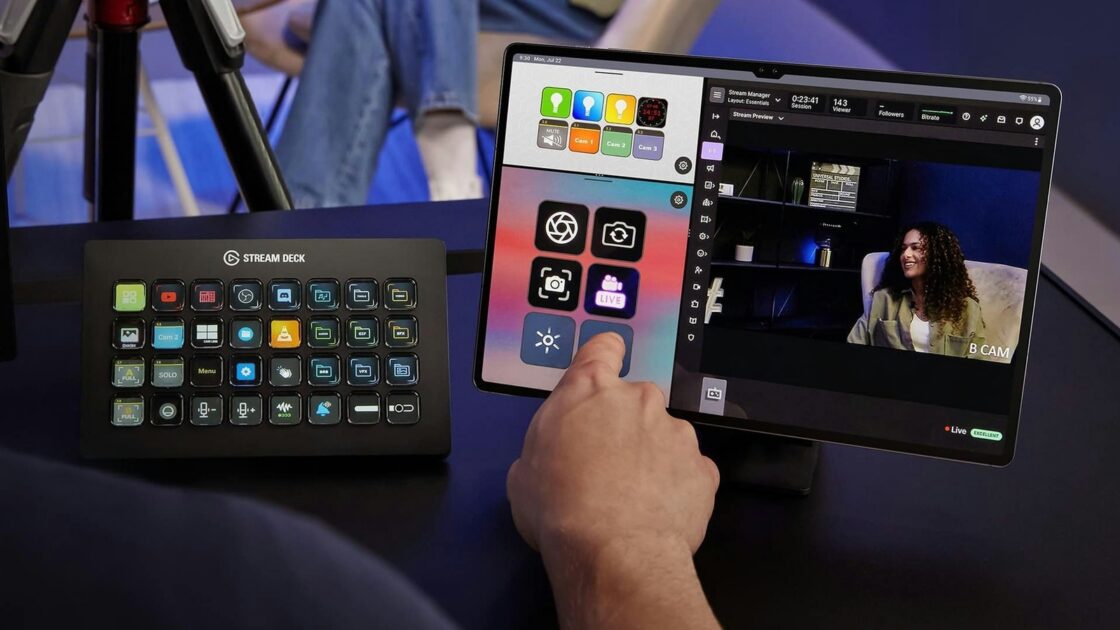
Old iPads and Android tablets sitting in drawers can be repurposed into virtual Stream Decks for streaming on platforms like Twitch or YouTube. Elgato provides a mobile app that allows both tablets and smartphones to function as controllers without requiring dedicated physical hardware.
How to set up your tablet as a Stream Deck
According to Engadget, transforming an iPad or Android tablet into a Stream Deck device requires downloading the official app on a computer running Windows 10 or macOS 10.15 and later, as well as on the tablet via the App Store or Google Play. Users can open the device picker in the top-left corner of the computer app, click “Add Mobile Device” to generate a QR code, and scan it with the tablet app to complete the pairing and setup process in about five minutes.
Both devices must connect to the same local network, meaning cellular data connections like 4G or 5G will not work. Users experiencing connection issues must ensure their computer’s firewall or antivirus software is not blocking the connection, and Windows users may need to switch their network profile from Public to Private. Apple users benefit from the ability to pair Mac and iPad apps over USB instead of Wi-Fi, which simplifies the process and provides a more stable connection with lower latency.
Customizing the app functions similarly to physical Stream Deck hardware, allowing users to drag actions from the panel onto empty keys on the tablet dashboard. Elgato offers plugins for essential streaming tools such as OBS Studio, Twitch, YouTube, and Spotify, alongside smart light support for brands like Philips Hue, Nanoleaf, and Govee.
Free version versus Stream Deck Mobile Pro
The free version of the mobile app provides up to six buttons and unlimited access to actions with no trial period, matching the button count of Elgato’s Stream Deck Mini for basic functions like starting a livestream or muting a microphone.
Upgrading to Stream Deck Mobile Pro expands the limit to 64 buttons, surpassing the Stream Deck + XL, while unlocking features such as custom backgrounds and different grid options. iPad users can also utilize Split View to display two separate keypads side by side. Subscription pricing is set at $2.99 per month or $24.99 annually, while a lifetime license is available for $49.99.
Streamers using a tablet as a Stream Deck should acquire an inexpensive tablet stand to keep the device visible, plug it in to prevent battery drain during broadcasts, and adjust display settings to prevent the screen from turning off by setting Auto-Lock to “Never” on iPads or using equivalent options on Android tablets.