
Table of Contents
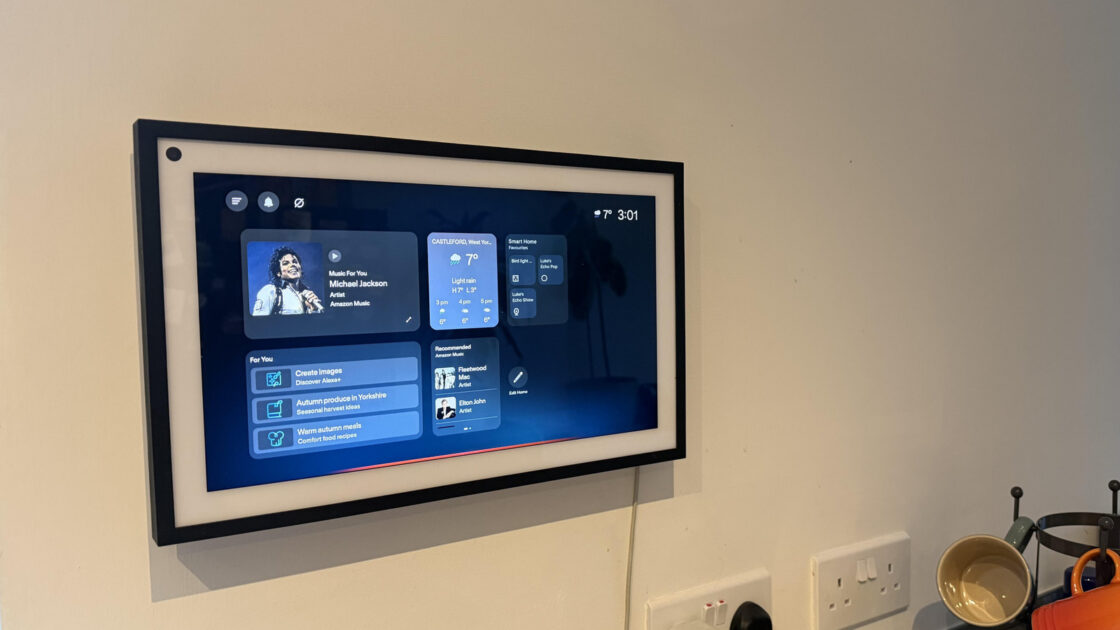
An Amazon Echo Show often functions merely as a kitchen clock, weather display, and cooking timer, but it also operates as a touchscreen smart home hub, video-calling camera, and Fire TV. Many of its best capabilities remain hidden deep within menus, and several work on older devices without requiring a new hardware purchase.
1. Map View Puts Your Smart Home on a Floor Plan
Alexa Home Map, showcased during Amazon’s October event, is an interactive 3D model of a house that maps connected devices such as lights, locks, thermostats, and cameras to their physical locations. Owners of older Echo Show 15 and 21 devices can already access a 2D version called Map View using Alexa+, which opens directly from the smart home dashboard. Users build the floor plan once within the Alexa app using a LiDAR-equipped iOS device, such as an iPhone 12 Pro or fourth-generation iPad or later.
To configure the feature, users open the Alexa app, navigate to Devices, select Map View, choose Start Now, and walk through their home room by room. Once transferred to the Echo Show, a single tap on a device opens a side panel with controls, while a double tap turns the device on or off. The map can also be filtered by device type or switched between floors, making it simpler for guests to operate home hardware. Amazon announced that the 3D Home Map will begin rolling out later in the year for larger Echo Show models, as well as the Alexa and Ring apps.
2. Routines That Start When You Walk Into the Room
Camera-equipped Echo Shows can initiate a Routine automatically when someone enters a room, such as turning on kitchen lights and reading the weather. Occupancy Routines activate whenever any presence is detected, working on the Echo Show 15, third-generation or newer Echo Show 10, second-generation or newer Echo Show 8, and select Echo speakers. Personal Presence Routines utilize Visual ID profiles to recognize specific individuals, allowing the device to deliver tailored news briefings or personal calendar updates. These personalized routines function on the Echo Show 8 second-generation and newer, Echo Show 10, the 2025 Echo Show 11, Echo Show 15, and Echo Show 21.
Users must first enroll in Visual ID directly from their Echo display. Afterward, they open the Alexa app, go to More, select Routines, tap the plus button, choose Add an Event, and select Presence Routine to configure the target user, watching Echo device, and desired actions. Amazon states that all presence-detection processing occurs locally on the Echo Show, sending no images or video data to the cloud.
3. Passing Shows to Your Other TVs
Larger Echo Show models feature a built-in Fire TV interface that provides access to Prime Video, Netflix, Disney+, YouTube, and HBO Max. A practical function of these displays is the ability to transfer video playback between screens, allowing users to start a cooking show on an Echo Show in the kitchen and finish watching it on the living room Fire TV. With Alexa+, users can utilize voice commands to request recommendations based on personal preferences, add titles to watchlists, pull up game statistics, or shift playback to a different television. Furthermore, these larger displays support browsing the full Amazon website for easier comparison shopping.
4. Keep Track of Everything You’ve Asked Alexa
With Alexa+, conversational queries are automatically saved as Cards organized by topic within the Card Gallery, where frequently used items can be pinned to the top. Rather than displaying a plain text transcript, Alexa+ constructs on-screen responses dynamically by incorporating visuals, videos, calendar events, and actionable options. When shopping for items like a rain jacket, Alexa can assemble a comparison chart, pricing details, and direct links. Amazon confirmed that these Cards are also accessible through the Alexa app and Alexa.com, allowing users to reference conversations initiated on an Echo Show while away from home.
5. Use the Camera as a Home Monitor
Enabling Home Monitoring lets users access a live feed from an Echo Show camera while away from home via the Alexa app, another Echo Show, a Fire TV, or a Fire tablet. The Echo Show 15 and 21 include a 13-megapixel wide-angle camera with auto-framing, while the Echo Show 16 introduces night vision and a Visual ID capable of recognizing users from up to 17 feet away. When paired with Ring cameras, Alexa+ can display them on the same screen and summarize camera activity for subscribers with a Ring Premium Legacy plan.
Amazon utilizes the large Echo Show screens to display full-screen sponsored advertisements when individuals approach the device. These ads began appearing in 2025 with no ad-free subscription option available, prompting some users to stop using the devices.